
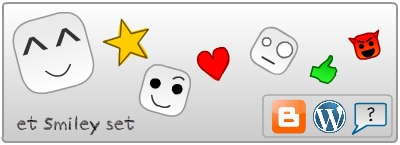
Yes! Now the ET Smileys set is available for use in any blog or website. Read on to find out how to add them to your website.
* See the list of smileys
Follow the simple steps below to add the smiley functionality to your website/blog:
Step #1
1) In your website/blog's HTML code, search for the part saying </head>
2) Now just before this, insert the below code:
And the first part is done!!
Step #2
Now you need to add the etSmileys class to the sections in your blog where you like the smileys to appear.
If you want the smileys everywhere in the website, search for <body> in the HTML code, and add the class as follows:
If you want the smileys in only particular sections of your blog, add the class to only those. For example, if a section has id main-content, the code would look like this:
Now add the new class as follows:
If main-content is already a class, then new code will look like this:
Step #3
Again, in the HTML code find the portion </body>
Yet again, add the following code just before this part
How it works?
You can simply type in the emoticon symbols in your arrticle/post, like in a chat.
The above script replaces the emoticon symbols you type with the corresponding smileys. For this you'll have to know the correct symbol for each smiley.
Example: :) becomes :)
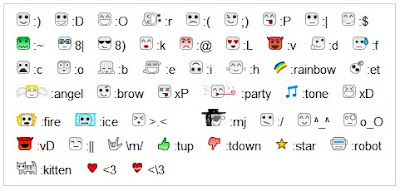
See a full table listing the ET Smileys and their symbols at the end of this post. You can bookmark the above link for quick reference.
Adding a smileys reference panel
You can add a smileys reference panel anywhere in your blog by pasting the following code at that location:
Complete smiley panel
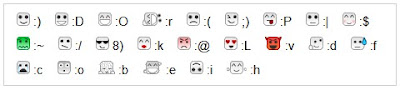
Minimalist smiley panel
Usage guideline:
One important point you should remember is to put a space before the symbol.. or else the smiley image won't appear.
Staying up-to-date and Keeping in touch..
The smiley list is never complete! Suggest your own ideas of interesting smileys that can be included in the list :i . You may make your suggestions at the comments. Please note that the current smileys are 16px in height, so that it won't create an unnecessary spacing between the text. So hope that your ideas won't go ABOVE that! :O
Whenever new smileys are added, the script will be updated automatically. But you'll need to know the new symbols for the fresh smileys. So stay connected to know the updates in the smiley data base.
Bookmark this page to stay in touch with the constantly updated smiley list and other related updates.
Put the smiley badge in your blog to let others know of the smileys and also for a quick link!

Get the smiley updates via Twitter: Follow me on twitter
Hope that helped! 8)
Spread the Word
So have you decided to use the et smileys? Then do a little favor. Kindly link back to this page so that others can also come to know about this smiley set. Thank you!! :)
The ET Smileys - Complete List:
* See the list of smileys
Follow the simple steps below to add the smiley functionality to your website/blog:
Step #1
1) In your website/blog's HTML code, search for the part saying </head>
2) Now just before this, insert the below code:
<script src="https://googledrive.com/host/0B_i-RnsPawncflc0cktkU0cxbHFtZTM1SW1pd19xd0loZzlkYlExcGg3RXJhU1haNHlndm8/et-smileys.min.js" type="text/javascript"/>
And the first part is done!!
Step #2
Now you need to add the etSmileys class to the sections in your blog where you like the smileys to appear.
If you want the smileys everywhere in the website, search for <body> in the HTML code, and add the class as follows:
<body class="etSmileys" >
If you want the smileys in only particular sections of your blog, add the class to only those. For example, if a section has id main-content, the code would look like this:
<div id="main-content"> ... </div>
Now add the new class as follows:
<div id="main-content" class="etSmileys"> ... </div>
If main-content is already a class, then new code will look like this:
<div class="main-content etSmileys"> ... </div>
Step #3
Again, in the HTML code find the portion </body>
Yet again, add the following code just before this part
<script
type="text/javascript"> etSmileys(); </script>
How it works?
You can simply type in the emoticon symbols in your arrticle/post, like in a chat.
The above script replaces the emoticon symbols you type with the corresponding smileys. For this you'll have to know the correct symbol for each smiley.
Example: :) becomes :)
See a full table listing the ET Smileys and their symbols at the end of this post. You can bookmark the above link for quick reference.
Adding a smileys reference panel
You can add a smileys reference panel anywhere in your blog by pasting the following code at that location:
Complete smiley panel
<script src="https://googledrive.com/host/0B_i-RnsPawncflc0cktkU0cxbHFtZTM1SW1pd19xd0loZzlkYlExcGg3RXJhU1haNHlndm8/et-smileys-panel-full.min.js" type="text/javascript"/>
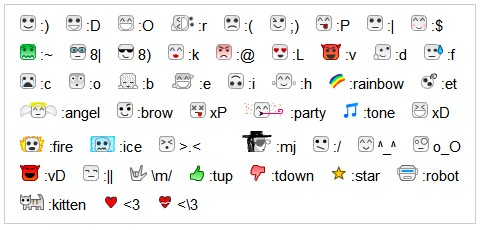
Minimalist smiley panel
<script src="https://googledrive.com/host/0B_i-RnsPawncflc0cktkU0cxbHFtZTM1SW1pd19xd0loZzlkYlExcGg3RXJhU1haNHlndm8/et-smileys-panel-basic.min.js" type="text/javascript"/>

Usage guideline:
One important point you should remember is to put a space before the symbol.. or else the smiley image won't appear.
Staying up-to-date and Keeping in touch..
The smiley list is never complete! Suggest your own ideas of interesting smileys that can be included in the list :i . You may make your suggestions at the comments. Please note that the current smileys are 16px in height, so that it won't create an unnecessary spacing between the text. So hope that your ideas won't go ABOVE that! :O
Whenever new smileys are added, the script will be updated automatically. But you'll need to know the new symbols for the fresh smileys. So stay connected to know the updates in the smiley data base.
Bookmark this page to stay in touch with the constantly updated smiley list and other related updates.
Put the smiley badge in your blog to let others know of the smileys and also for a quick link!
Embed code:
Get the smiley updates via Twitter: Follow me on twitter
Hope that helped! 8)
Spread the Word
So have you decided to use the et smileys? Then do a little favor. Kindly link back to this page so that others can also come to know about this smiley set. Thank you!! :)
 | smile | :) |
 | laugh | :D |
 | lol | :O |
 | rotfl | :r |
 | sad | :( |
 | wink | ;) |
 | tongue | :P |
 | straight | :| |
 | blush | :$ |
 | kiss | :k |
 | angry | :@ |
 | love | :L |
 | devil | :v |
 | daydream | :d |
 | sweat | :f |
 | cry | :c |
 | wow | :o |
 | sick | :~ |
 | nerd | 8| |
 | cool | 8) |
 | bow | :b |
 | dance | :e |
 | inverted | :i |
 | hug | :h |
 | confused | :/ |
 | laugh | xD |
 | smile | ^_^ |
 | stunned | o_O |
 | muahaha | :vD |
 | straight | :|| |
 | dead | xP |
 | frustrated | >.< |
 | et! | :et |
 | rock on | \m/ |
 | heart | <3 |
 | broken | <\3 |
 | angel | :angel |
 | raise brow | :brow |
 | party | :party |
 | on fire | :fire |
 | frozen | :ice |
 | musical note | :tone |
 | rainbow | :rainbow |
 | vote up | :tup |
 | vote down | :tdown |
 | star | :star |
 | robot | :robot |
 | kitten | :kitten |
 | MJ | :mj |





Bro.. my blog platform is blogger but with disquss comment system.. :( would you help me to hack it?? i want it badly u know.. :c :c :c :c :c :c
ReplyDeleteIm waiting here in a great epectation.. :rainbow
Пост неплохой, закину сайт в закладки. [url=http://tutledy.ru/kachestva-muzhchin.html]качества мужчины[/url]
ReplyDeleteNot working for me :(
ReplyDeleteI'm using blogger dynamic templates
how to download the smileys? :)
ReplyDelete10q.. :) (Y)
ReplyDeletehey guys join new social platform for the world
ReplyDeletehttp://www.f2qbook.com/hot_content.php
test at once...... and comment for suggestions
:e
ReplyDelete